DH PROD/IMPL Deployment Guide
1. Related Documents
The following document should be referred to during the deployment process:
2. Overview
The Deployment Team will receive deployment requests from the BSA Team for either:
- DH PROD deployments
- DH IMPL deployments
The deployment procedure varies slightly depending on the type of release being deployed.
3. DH PROD Deployment
For DH PROD deployments, the BSA Team will provide the current DH related versions (refer to the Version Tracking section below).
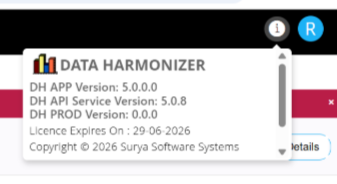
The BSA Team may also specify a target release version based on project requirements.
If no target version is specified, deployment of the latest stable release may be recommended.
4. DH IMPL Deployment
For DH IMPL deployments, the BSA Team will specify the exact release version that must be deployed.
5. Release Types
DH releases are generic and applicable to all clients, whereas DH IMPL releases are client-specific.
Examples
DH PROD Release
DH_RELEASE_V2.0.5.zip
DH IMPL Release
BOC_V1.0.0.zip
6. Release Repository
Both DH and DH IMPL releases are available on:
sftp.surya-products.com
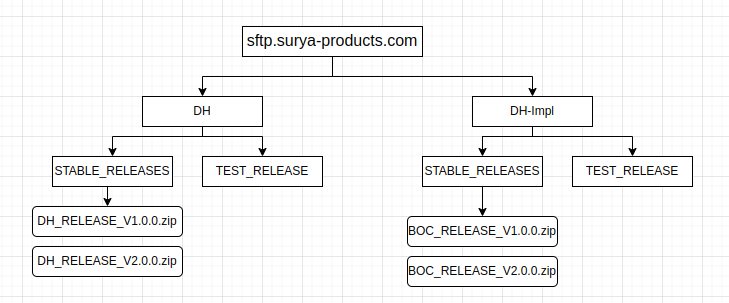
The releases follow a standardized folder structure.
Important: Always download releases from the Stable folder unless explicitly instructed otherwise.
7. Release Package Structure
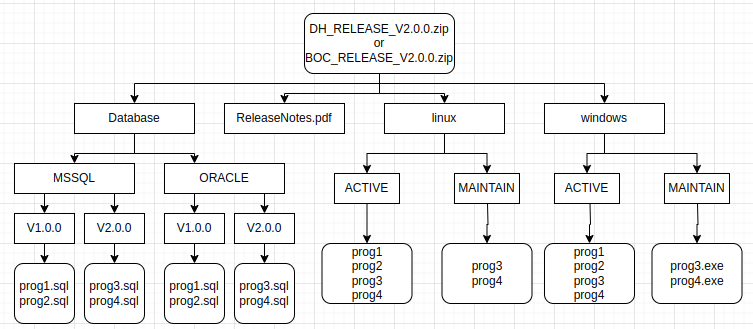
After extracting the release package, the directory structure will contain the program binaries and associated database seeds.
Example
Assume:
Current release version: V2.0.0
- Programs:
prog3,prog4
- Programs:
Previous release version: V1.0.0
- Programs:
prog1,prog2
- Programs:
The deployment should be performed according to the client's current version and upgrade path.
8. Deployment Procedure
8.1 Deploy Program Binaries
Based on the client's operating system and database platform:
- Identify the appropriate binaries.
- Copy the binaries to the
SH_PROGRAMdirectory.
Important: Always take a backup of the existing binaries before replacing them.
8.2. Execute Database Seeds
Execute the required seed scripts in the Data Harmonizer database (formerly RunControl).
The exact scripts to be executed depend on the client's current version.
9. Deployment Scenarios
9.1 New Client Deployment
For a new client:
- Use binaries from the Active folder.
- Execute all available seed scripts in ascending version order.
9.2 Existing Client on Previous Release
For a client already running the immediately previous release:
- Use binaries from the Maintain folder.
- Execute only the seed scripts corresponding to the new release.
9.3 Existing Client on an Older Release
If the client is not running the immediately previous release:
- Follow the incremental upgrade path.
- Deploy intermediate releases sequentially.
- Execute the corresponding seed scripts for each version in order.
This ensures that all required database changes are applied correctly.
10. Version Tracking
Each database version folder contains an update_version.sql script.
This script updates the stored DH PROD version information, allowing the deployed version to be displayed within the application and sIMPLifying version tracking.
11. Important Notes
11.1 Build Selection
- Use builds from the Active folder for new client deployments.
- Use builds from the Maintain folder for existing client upgrades.
- If the client is not on the previous release version, follow the incremental upgrade procedure.
11.2 Seed Execution
All version-specific seed scripts are included within the release package.
11.2.1 New Client
Execute all seed scripts in version order.
11.2.2 Existing Client
Execute only the seed scripts required to upgrade from the current version.
11.2.3 Older Client Version
Execute seed scripts incrementally for each intermediate release version.
11.3 DH PROD Version Tracking
DH PROD version tracking is supported from DH-APP v5.14.4 onwards.
Since version tracking was not maintained previously:
- During the first deployment request for a client, upgrade the DH application to the latest stable version.
- Use the version mapping matrix provided by the team.
- Update the database with the client's current DH PROD version.
This enables accurate version tracking going forward.
11.4 Query Executor Usage
A release may contain a large number of SQL scripts because each binary can have its own seed file.
Instead of manually executing individual SQL files:
- Use the Query Executor utility to execute scripts efficiently.
- Refer to the Query Executor Help Document for detailed usage instructions.
Query Executor Version
v2.3.0
Availability
The Query Executor binary is available in:
DH v4.3.0
12. Best Practices
- Always deploy binaries from the Stable release directory.
- Take backups before replacing existing binaries.
- Follow incremental upgrade paths when required.
- Execute seed scripts in the correct version order.
- Update the DH PROD version after deployment.
- Use Query Executor for executing large numbers of seed scripts.
- Maintain deployment records for audit and troubleshooting purposes.